
How Businesses Can Generate Leads and Engage Customers with WhatsApp Campaigns
Turn customer lists into conversations, enquiries and measurable business opportunities with Commbots Campaigns.
A customer may see your social media post and continue scrolling.
They may receive your email and leave it unopened.
But when a relevant message reaches them on WhatsApp, the next step is immediately available: reply, request information, book an appointment, visit a website or speak to a sales representative.
This is what makes WhatsApp campaigns valuable for modern businesses.
A well-planned WhatsApp campaign is not simply a bulk message. It is a targeted communication designed to achieve a specific business outcome—such as generating leads, re-engaging prospects, announcing a product, confirming an appointment or updating customers about an important change.
Commbots Campaigns helps businesses manage the complete process from one platform.
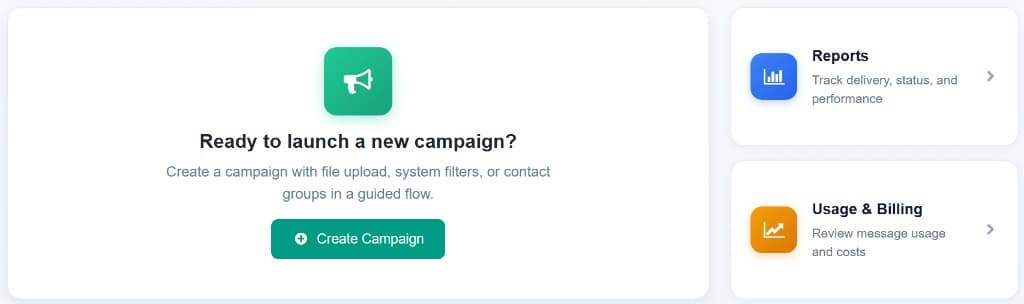
WhatsApp itself identifies lead generation, engagement marketing, promotions, customer notifications, commerce and support as major uses of its Business Platform. Commbots connects that platform to your team through WhatsApp Business API, WhatsApp Marketing, and a shared team inbox.
What is a WhatsApp campaign?
A WhatsApp campaign is a targeted message sent to a selected group of customers or prospects through the official WhatsApp Business Platform.
Businesses can use campaigns to:
- Generate new sales enquiries
- Follow up with existing leads
- Promote products and services
- Announce new launches
- Invite customers to events
- Recover inactive prospects
- Share offers and promotions
- Send appointment reminders
- Notify customers about service updates
- Communicate urgent alerts
- Collect customer responses
- Direct interested customers to sales agents
Why WhatsApp campaigns are effective for businesses
WhatsApp creates a direct communication path between a business and its customers.
Instead of asking someone to complete a long form or search for the company's contact details, a campaign can let the customer respond immediately.
A recipient can tap a button, ask a question, request a quotation, book an appointment, visit a product page, confirm attendance, speak to an agent, or opt out of future promotional messages.
This makes WhatsApp useful throughout the customer journey—from initial awareness to lead generation, sales follow-up and ongoing customer service.
The real value is not only that the message is delivered. The real value is what happens after the customer receives it.
1. Generate leads through WhatsApp campaigns
One of the most valuable uses of Commbots Campaigns is lead generation.
A campaign can introduce an offer to an interested audience and give recipients an immediate way to respond.
For example, a property company could send:
Hi {{name}}, new apartments are now available in Dubai Creek Harbour. Would you like to receive floor plans, prices and available payment options?
Buttons: Send me details · Book a viewing · Speak to an agent
When the customer responds, the conversation can be handled from the Commbots shared inbox and assigned to the appropriate sales representative.
The campaign therefore becomes more than an announcement. It creates a structured lead-generation process:
Lead-generation campaigns can be used for:
The strongest lead-generation campaigns usually have one clear offer and one primary action.
- Property enquiries
- Vehicle test-drive bookings
- Product demonstrations
- Consultation requests
- Insurance quotations
- Education programme enquiries
- Event registrations
- Restaurant or hospitality bookings
- Service quotations
- Software demo requests
2. Re-engage leads that have stopped responding
Many businesses already have valuable leads inside spreadsheets, CRM systems and contact databases.
Some requested information but did not purchase. Others spoke with a salesperson and then stopped responding. Some may simply have been waiting for the right timing, product or offer.
Commbots Campaigns can help businesses reconnect with these audiences using relevant follow-up messages.
For example:
Hi {{name}}, are you still interested in the {{product}} you enquired about? New availability has just been released. Reply below and our team will assist you.
Buttons: Yes, send details · Call me · Not interested
This is often more effective than sending a general promotion because the message is connected to the customer's previous interest.
Useful re-engagement audiences include:
The more accurately the audience is segmented, the more relevant the campaign can become.
- Leads with no activity during the last 30 days
- Customers who requested a quotation
- Prospects who attended a product demonstration
- Customers with abandoned enquiries
- Previous event attendees
- Customers whose preferred item was unavailable
- Prospects who asked to be contacted later
- Customers approaching renewal
3. Improve customer engagement
Customer engagement is not achieved by sending messages repeatedly. It is achieved by sending communications that customers find timely, useful or interesting.
WhatsApp campaigns can help businesses maintain a relationship with customers between purchases and service interactions.
Engagement campaigns could include:
- Helpful product tips
- Invitations to private events
- Seasonal service reminders
- Customer feedback requests
- Loyalty programme updates
- New branch announcements
- Educational content
- Relevant product recommendations
- Renewal reminders
- Exclusive customer benefits
Engagement message examples
The message should be useful, personalised and connected to an existing customer relationship. That is the difference between meaningful engagement and unnecessary messaging.
Service reminder
Hi {{name}}, your vehicle may be due for its next service. Would you like us to check available appointments at your preferred branch? Buttons: Check appointments · Contact service team · Remind me later
Loyalty update
Hi {{name}}, your loyalty rewards are ready. Would you like to see this month's exclusive benefits? Buttons: View rewards · Shop now · Not now
4. Build brand awareness
Not every campaign needs to produce an immediate sale. WhatsApp can also help a business keep its brand visible among customers who have already shown interest or given permission to receive updates.
A brand-awareness campaign may introduce a new business location, a newly available service, a company milestone, a new partnership, a redesigned mobile application, a sustainability initiative, an upcoming exhibition, a new customer experience, a seasonal collection, or a new market launch.
For example:
We are now closer to you. Our new Abu Dhabi branch is officially open, with an expanded showroom and customer service centre.
Buttons: View location · Explore services · Contact us
Brand-awareness messages should still have a purpose. They should help customers understand what is new, why it matters and what they can do next.
5. Announce new products and services
Launching a new product is one of the strongest use cases for WhatsApp marketing campaigns.
Commbots allows businesses to combine approved templates with personalisation, images, videos, documents, buttons and supported interactive formats.
A product announcement can include product name, key customer benefit, launch date, starting price, availability, product image or video, catalogue or brochure, website link, enquiry button and sales contact option.
For example:
Hi {{name}}, the new {{model}} has arrived. Discover its updated design, advanced technology and available launch offers.
Buttons: View the new model · Download brochure · Book a test drive
Customers interested in the product can move immediately from awareness to enquiry. A strong product campaign focuses on the customer benefit rather than presenting a long list of technical features.
Product-update campaigns are useful for:
- New vehicle launches
- Property project releases
- Fashion collections
- Software features
- Mobile application updates
- Restaurant menus
- Financial products
- Training programmes
- Healthcare services
- New subscription plans
- Retail stock arrivals
6. Promote offers without making every message feel generic
WhatsApp campaigns can be used for promotions, but the message should be more thoughtful than a basic discount announcement.
Commbots allows the audience to be selected using uploaded files, system data filters or prepared contact groups. This means different customers can receive different campaigns based on their interests.
For example: existing SUV owners receive an SUV upgrade campaign; customers in Riyadh receive a Riyadh event invitation; previous buyers receive a loyalty offer; interested property investors receive investment-related projects; Arabic-speaking contacts receive an approved Arabic template; English-speaking contacts receive the corresponding English version.
A targeted campaign is more likely to feel relevant than one message sent indiscriminately to an entire database.
Promotional campaign ideas
Every promotion should make the value and next step easy to understand.
- Limited-time offers
- Seasonal sales
- Exclusive customer discounts
- Early-access launches
- Loyalty rewards
- Bundle offers
- Upgrade opportunities
- Back-in-stock announcements
- Event promotions
- Product recommendations
- Cart or enquiry recovery
7. Send bulk announcements
Businesses regularly need to distribute important information to a large customer audience. Commbots Campaigns provides a controlled way to prepare, personalise and track these communications.
Bulk announcements may include new branch openings, changes in business hours, holiday schedules, event announcements, changes to contact information, service availability updates, important company notices, registration openings, application deadlines, new delivery locations, temporary closures and maintenance schedules.
For example:
Dear {{name}}, our offices will be closed on {{date}} for the public holiday. Normal working hours will resume on {{reopening_date}}.
An announcement does not always need a promotional call to action. Sometimes the objective is simply to ensure that customers receive important information.
8. Deliver alerts and urgent notifications
Some communications are time-sensitive. Customers may need to know immediately about a service interruption, appointment change, delivery delay or unexpected closure.
Campaigns can help distribute these updates to the affected audience: delivery delays, appointment changes, service interruptions, temporary branch closures, event postponements, system maintenance, order issues, weather-related notices, application-status updates and security-related customer notices.
For example:
Important update: today's event at {{location}} has been postponed due to weather conditions. We will share the revised date shortly.
The audience should be limited to the people affected by the alert. This keeps the communication relevant and reduces unnecessary messages.
9. Keep customers updated throughout their journey
WhatsApp campaigns are not limited to marketing. They can also help businesses communicate with customers before, during and after a purchase or service.
Before purchase: product availability, quotation follow-up, viewing or demo invitations, event registration, consultation confirmation.
During purchase or service: appointment reminders, payment reminders, document requests, order confirmations, progress updates, delivery notifications.
After purchase: installation updates, service reminders, renewal notices, feedback requests, warranty information, product-care tips, relevant upgrades.
Keeping customers informed reduces uncertainty and can also reduce the number of incoming calls asking for updates.
What Commbots Campaigns provides
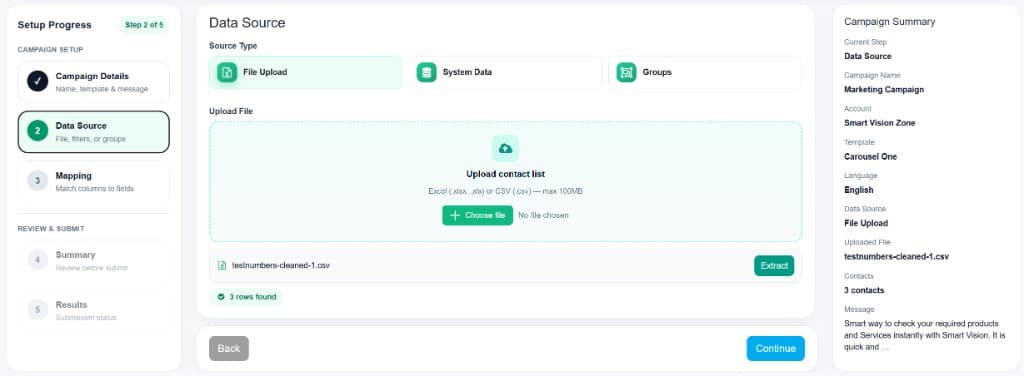
Commbots brings campaign creation, audience management, delivery tracking and customer replies into one workspace — built on official WhatsApp Business API connectivity.
Flexible audience selection
File Upload
Upload an Excel or CSV file containing customer numbers and any required personalisation fields.
System Data
Use customer records already available in Commbots and apply relevant filters.
Contact Groups
Select prepared groups for recurring campaigns or defined customer segments.
Shared reply management
When customers respond, their replies become conversations your team can manage in the shared inbox.
Personalised messages. Map fields such as customer name, product, location, appointment date, order reference, vehicle model, assigned representative or renewal date. Personalisation makes the message more relevant while allowing the campaign to be managed at scale.
Approved WhatsApp templates. Select an approved message template and its corresponding language. Templates may include text, variables, images, videos, documents, quick-reply buttons, website buttons, call buttons and supported carousel formats. The available content depends on the approved template and the connected WhatsApp Business account.
Campaign reports. Commbots Reports helps teams monitor campaign processing and delivery with statuses such as Sent, Delivered, Read, Waiting, Failed and Completed. Campaign Details can also help teams review recipient activity and supported button responses.
Customer opt-out protection. Commbots can apply available opt-out information when processing applicable campaign audiences. Businesses should only contact customers who have given the appropriate permission and should always respect requests to stop receiving messages.
How to create a campaign in Commbots
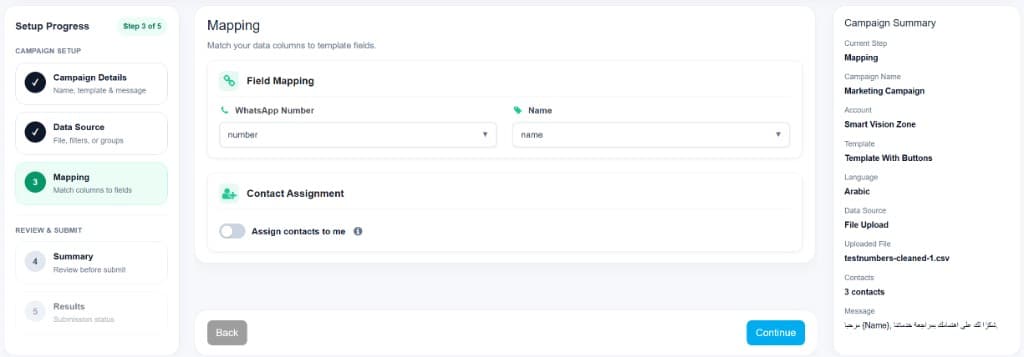
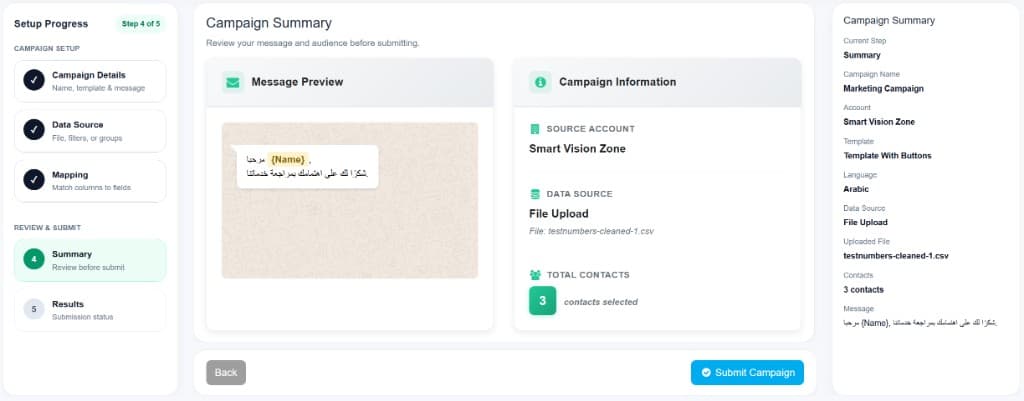
Commbots provides a guided campaign flow.
- 1
Enter campaign details
Create a clear internal campaign name, then select the WhatsApp Business account, approved template and template language. Review the template content and confirm which personalisation fields are required. A useful name could be: UAE Existing Leads – New Product Launch – July 2026.
- 2
Choose the audience
Select File Upload, System Data or Contact Groups. Confirm that the selected audience matches the campaign objective. For example, a service-renewal campaign should target customers approaching renewal—not every contact in the database.
- 3
Map the fields
Connect source columns or system fields to WhatsApp Number and template variables. Example: mobile_number → WhatsApp Number, customer_name → {{1}}, product_name → {{2}}, branch → {{3}}. Review carefully, and where appropriate use Assign contacts to me to establish follow-up ownership.
- 4
Review the campaign
Check account, audience source, contact count, template, language, personalisation, media, buttons, message preview, assignment and opt-out exclusions. The preview should read naturally with realistic customer values.
- 5
Submit and track
Submit the campaign for processing. After submission, open Reports or Campaign Details to follow delivery performance, identify failed records and review customer responses.

Practical WhatsApp campaign ideas by industry
Real estate
New project launches, viewing invitations, price updates, unit availability, investor events, dormant-lead follow-up and property handover updates.
Automotive
New model launches, test-drive invitations, service reminders, vehicle availability, trade-in campaigns, insurance renewal reminders and customer events.
Retail and e-commerce
New collections, back-in-stock alerts, abandoned enquiry follow-up, seasonal promotions, delivery updates, loyalty rewards and product recommendations.
Healthcare
Appointment reminders, clinic announcements, health-package information, follow-up reminders, schedule changes, service availability and patient feedback requests. Follow applicable privacy, consent and regulatory requirements.
Education
Course registrations, admission deadlines, open-day invitations, class reminders, schedule updates, programme launches and student announcements.
Hospitality & professional services
Reservation confirmations, event promotions, seasonal packages, guest updates, consultation invitations, renewal reminders, webinar registrations and customer feedback.
How to make WhatsApp campaigns more effective
Start with one objective. Decide whether the campaign should generate enquiries, book appointments, increase registrations, announce a launch, confirm attendance, update customers, recover inactive leads or collect feedback. Do not combine several unrelated objectives in one message.
Segment the audience. Possible criteria include country, city, language, product interest, customer type, previous enquiry, purchase history, lead status, assigned salesperson, last interaction, renewal date and marketing permission.
Write a strong opening. Customers should immediately understand why they are receiving the message. Instead of "We are pleased to announce an exciting offer from our company," use "Hi {{name}}, the property you enquired about now has a new payment-plan option."
Keep the message focused. A good campaign message normally contains a relevant opening, the main value or update, and one clear next step. Avoid long introductions, excessive capitalisation and too many competing buttons.
Use clear calls to action. Useful actions include Get details, Request a quotation, Book now, Speak to sales, Download brochure, Confirm appointment, View location, Register now, Request a call and Stop promotions.
Prepare agents for replies. Before submitting, confirm which team will receive replies, who will own conversations, how quickly agents should respond, what information agents need, how leads will be qualified and where outcomes will be recorded.
Use the appropriate language. For audiences across the UAE, Saudi Arabia and other GCC markets, separate Arabic and English campaigns can improve message quality, reporting and personalisation.
Respect customer preferences. Maintain consent records, explain who is sending the message, avoid excessive frequency, send relevant content, provide a clear opt-out method where appropriate, respect opt-out requests and protect uploaded customer data.
How to measure campaign success
Sent, delivered and read statuses are useful, but they do not provide the complete picture. Campaign performance should be evaluated according to the original objective.
Metrics that matter
Delivery metrics
Total campaign contacts, messages processed, sent, delivered, read and failed.
Engagement metrics
Customer replies, button responses, website visits, brochure requests, calls requested and opt-outs.
Business metrics
Leads generated, qualified leads, appointments booked, test drives, quotations, event registrations, purchases, renewals and revenue.
The right question
The most useful question is not "How many messages did we send?" It is "What valuable customer actions did the campaign generate?"
A campaign example from start to finish
Imagine that an automotive company has 2,000 customers and prospects who previously enquired about SUVs. The marketing team creates a campaign announcing a new SUV model.
Audience: contacts who previously enquired about SUVs, are located near participating branches, have permission to receive marketing updates, and have not opted out.
Message: Hi {{name}}, the new {{model}} has arrived at our {{branch}} showroom. Would you like to book a test drive or receive the brochure?
Buttons: Book test drive · Download brochure · Speak to sales
Personalisation: customer name, vehicle model, nearest branch.
Follow-up: customers who respond are handled through the Commbots shared inbox and assigned to the relevant sales team.
Measurement: delivered messages, read messages, button responses, test-drive bookings, sales enquiries, opt-outs and failed numbers.
The campaign does not end when the messages are sent. It ends when the team understands what happened and uses the results to improve the next campaign.
Final thoughts
WhatsApp campaigns can support almost every stage of customer communication. They can help a business create awareness, introduce products, generate leads, re-engage prospects, increase customer interaction, send important announcements, deliver alerts, provide service updates, confirm appointments and maintain customer relationships.
Commbots Campaigns brings these activities into one structured workflow. Businesses can choose the right audience, personalise approved WhatsApp templates, use engaging media and buttons, monitor delivery and manage every customer reply through a shared inbox.
The result is not simply bulk messaging. It is a more organised way to turn business communication into customer action.
Explore WhatsApp Marketing, WhatsApp Business API and the shared team inbox to see how Commbots connects campaigns to conversations.
Frequently asked questions
What are WhatsApp campaigns used for?+
Businesses use WhatsApp campaigns for lead generation, product promotion, customer engagement, brand awareness, appointment reminders, bulk announcements, alerts, customer updates and sales follow-up.
Can WhatsApp campaigns generate leads?+
Yes. A campaign can introduce an offer and allow interested customers to request details, book an appointment, obtain a quotation or speak directly with a sales representative. Lead generation works best when the audience is relevant, the message is personalised and the call to action is clear.
How does Commbots help with WhatsApp lead generation?+
Commbots lets businesses select an audience, use approved templates, personalise messages, add supported media and buttons, submit the campaign, track delivery and manage customer replies from a shared inbox.
Can businesses send product updates through WhatsApp?+
Yes. Businesses can announce new products, updated models, availability, new features, new branches, collections and relevant customer offers using suitable approved templates.
Can Commbots send bulk announcements and alerts?+
Commbots Campaigns can be used to distribute announcements, service notifications, schedule changes, customer alerts and other important updates to an appropriate selected audience.
Can messages be personalised?+
Yes. Campaign fields can be mapped to template variables such as customer name, product, branch, appointment date, order number or assigned representative.
What audience sources can be used?+
Campaign audiences can be selected using Excel or CSV file uploads, filtered system data or prepared contact groups.
What happens when customers reply?+
Customer replies can become conversations in the Commbots shared inbox, where the relevant agent or team can continue the interaction.
How should campaign performance be measured?+
Businesses should review delivery, reads, replies, button responses, failed messages, leads, appointments, conversions and opt-outs. The most important metrics depend on the campaign's original objective.
Are WhatsApp campaigns suitable for customer notifications?+
Yes. Businesses can use suitable messages for appointment reminders, order updates, renewal notices, branch announcements, service changes and other customer communications.
Can campaigns be sent in Arabic and English?+
Yes, when the corresponding approved language versions are available. Businesses can create separate Arabic and English audiences and select the relevant template language for each campaign.
Is customer consent required?+
Businesses should only contact customers when they have the appropriate permission and should respect all requests to stop receiving communications. The business remains responsible for its customer data, messaging practices and applicable legal requirements.
Keep exploring Commbots
Ready to launch your next WhatsApp campaign?
Select your audience, personalise approved templates, track results and manage every reply in Commbots.